- Who
- Support lead, start of a shift
- Goal
- Clear the urgent tickets first
- Must never miss
- A breached response time
- Gives up when
- Search returns noise
03 / 06
UI/UX design
Interfaces designed around the task people are trying to complete, with accessibility built in and the same team designing and building.
WHAT IT IS
Design that survives contact with real use.
A screen is a set of decisions about what matters. We make those decisions from the user’s task, not from a template: what they need to see first, what they must never miss, and what happens when something goes wrong.
Because the same team designs and builds, the interface that ships is the interface that was agreed, down to the focus states, the error messages and the smallest screen.
FILM0:53
UI/UX design at Aksali, in one minute
From the task people are trying to finish to structure, one design system, every state and accessibility.
Read the transcript
Too many interfaces are designed for the screenshot. The question that matters: can people finish what they came to do?
We start with the task: what people need, and where they get stuck.
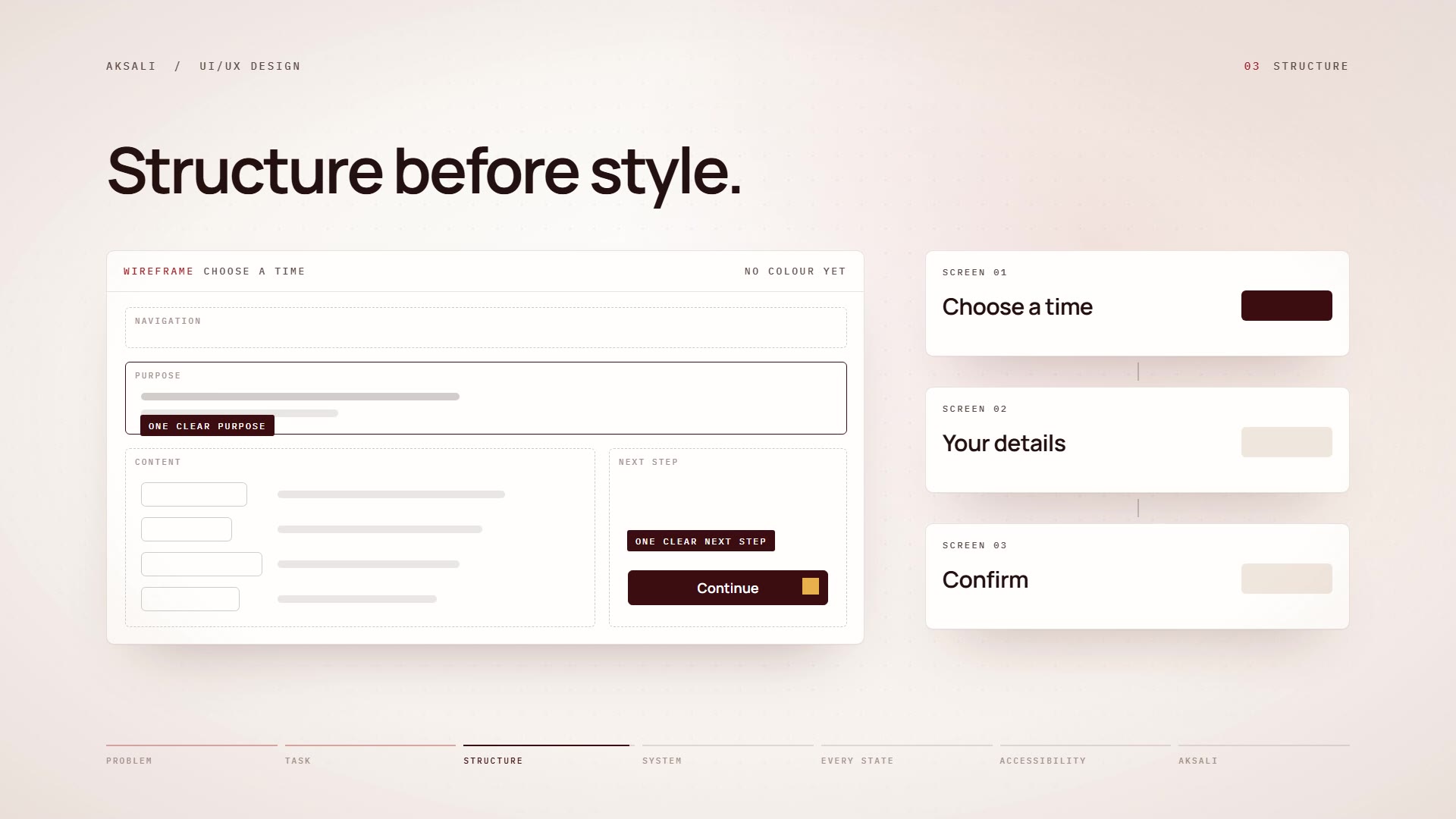
Then we settle the structure, before any colour or style. Every screen has one clear purpose, and one clear next step.
Type, colour, spacing and components become one system, used everywhere.
Errors, empty screens and slow connections get the same care.
And accessibility is built in from the start: contrast, keyboard and screen readers.
Design that is clear, consistent and made for everyone. Aksali Technologies. Genuine engineering.
PROBLEMS WE SOLVE
Where interfaces usually fail people
Most usability problems are decisions nobody made on purpose.
- 01
Users who do not finish the task
Forms abandoned halfway and features nobody finds. We find where people stall and redesign the path.
- 02
An interface that grew without a system
Ten button styles and three greys. We consolidate it into a design system that keeps every new screen consistent.
- 03
Accessibility as an afterthought
Keyboard traps, low contrast and missing labels. We design and test to WCAG 2.2 AA from the start.
- 04
Difficult moments handled carelessly
Errors, empty states and stressful situations deserve the most care. We design them first, not last.
HOW WE WORK
From the user’s task to a finished interface
Structure first, polish last, and the build checked against the design on real devices.
Understand the task
Who uses this, what they are trying to do, and what would make them give up.
Settle the structure
Information architecture and flows are agreed in low fidelity, before any visual polish.
Design the system
Type, spacing, colour and components are defined once, so every screen speaks the same language.
Build and verify
The same team implements the design in code, then checks it on real devices and with assistive technology.
WHAT WE PROVIDE
What we provide
Product and interface design
Screens and flows for web applications, dashboards and tools, designed around the user’s task.
UX audits
A structured review of an existing product: where people stall, what confuses them and what to fix first.
Design systems
Tokens, components and usage rules that keep a product consistent as it grows.
Accessibility
Design and implementation to WCAG 2.2 AA, tested with keyboard, screen readers and automated checks.
Responsive design
Layouts that hold from small phones to large monitors, not only at three breakpoints.
Prototypes
Clickable prototypes that test a flow with real people before anything is built.
TYPICAL APPLICATIONS
Typical engagements
- 01
Design a new product
From the first flows to a finished, built interface with its own design system.
- 02
Fix an interface that is not working
An audit of where people struggle, followed by a redesign of the paths that matter most.
- 03
Meet accessibility standards
An existing interface reviewed and brought up to WCAG 2.2 AA, with automated checks to keep it there.
WHAT TO EXPECT
What you can expect
A direct line to the engineer
You speak with the person designing and building your system, from the first call to hand-over.
A written plan before we build
What we will build, how, what it will take, and how we will know it works.
Working software early
Short increments you can see and test, rather than one reveal at the end.
Honest reporting
Results reported with their limits, and a clear word when a simpler approach would serve you better.
Everything handed over
Code, documentation and what you need to run and extend the system yourselves.
WHY IT IS DIFFERENT
Designed from the task, built by the same hands
Most of what makes an interface good is invisible until it is missing.
| Common practice | How we work |
|---|---|
| Start from a template or a trend | Start from the task people are trying to complete |
| Design the happy path | Design errors, empty states and edge cases with the same care |
| Hand a design file to another team | Design and build in the same team, so nothing is lost |
| Check accessibility before launch, if at all | Build it in from the start and test it automatically |
Have an interface people struggle with?
Show us where it hurts. We will tell you what we would change first, and why.
Start a conversation